
Basic Imageprocessing in C Part 3
Introduction
In the previous two parts of this series we have implemented functionalities in our program to read and write a PPM image in a buffer and grayscale each pixel so that we can use it in order to apply filters to it. In this part we will finally implement some basic filters to use against our image. The image filters used here are implemented as a matrix with a dimensionality of 3x3 called a kernel. Higher dimensionalities such as 5x5 or 7x7 are also possible but we will just use a 3x3 matrix for our kernel because this dimensionality already gives satifactory results for most image processing operations. Now these matrices contain coefficients that are specific to the filtering method that this kernel represents. Consequently the coefficients for a gaussian blur filter are going to be different to the coefficients of a sharpen filter. The coefficient that I will be using for my implementation of different filter are taken from this [1].
Implementation
Firstly I will need to create a two-dimensional array to represent the kernels that will be availabel for our filter function. I decided to use symbolic constants or macros to define these arrays.
#define SHARPEN ((float[3][3]){{0, -1, 0}, {-1, 5, -1}, {0, -1, 0}})
#define GBLUR   ((float[3][3]){{0.0625, 0.125, 0.0625}, {0.125, 0.25, 0.125}, {0.0625, 0.125, 0.0625}})
#define BSOBEL  ((float[3][3]){{-1, -2, -1}, {0, 0, 0}, {1, 2, 1}})
#define TSOBEL  ((float[3][3]){{1, 2, 1}, {0, 0, 0}, {-1, -2, -1}})
#define LSOBEL  ((float[3][3]){{1, 0, -1}, {2, 0, -2}, {1, 0, -1}})
#define RSOBEL  ((float[3][3]){{-1, 0, 1}, {-2, 0, 2}, {-1, 0, 1}})
#define OUTLINE ((float[3][3]){{-1, -1, -1}, {-1, 8, -1}, {-1, -1, -1}})
#define EMBOSS  ((float[3][3]){{-2, -1, 0}, {-1, 1, 1}, {0, 1, 2}})
Now that we have the kernels with the appropriate coefficients we can implement a function that goes through our buffer created in part 1 and applies convolution. But first we need a function to make a copy of our buffer because we dont want to make changes on a buffer we are operating on, that would change the result of our filtering significantly.
ImageData *copyBuffer(ImageData *src) {
  int i, j;
  ImageData *data = (ImageData *)malloc(sizeof(ImageData));
  data->rows = src->rows;
  data->cols = src->cols;
  data->matrix = (Color *)calloc(data->rows * data->cols, sizeof(Color));

  for (i = 0; i < data->rows; i++) {
    for (j = 0; j < data->cols; j++) {
      data->matrix[i * data->cols + j].red =
          src->matrix[i * data->cols + j].red;
      data->matrix[i * data->cols + j].green =
          src->matrix[i * data->cols + j].green;
      data->matrix[i * data->cols + j].blue =
          src->matrix[i * data->cols + j].blue;
    }
  }

  return data;
}
Notice that we copy to whole buffer together with the padding offset. This is to ensure that we will have an easier time iterating through the copied buffer and writing it’s contents into the source buffer, after convolution is done. We also need to destruct the copied buffer after we wrote it’s contents into the source buffer.
Our final function would look like this.
void filter(ImageData *srcBuffer, float kernel[3][3]) {
  int i, j;
  float sum;

  ImageData *cpy = copyBuffer(srcBuffer);

  // perform convolution on the srcBuffer and save results into cpy
  for (i = 1; i < srcBuffer->rows - 1; i++) {
    for (j = 1; j < srcBuffer->cols - 1; j++) {
      sum = 0;
      int ki, kj;
      for (ki = -1; ki <= 1; ki++) {
        for (kj = -1; kj <= 1; kj++) {
          sum += srcBuffer->matrix[(i + ki) * srcBuffer->cols + (j + kj)].red *
                 kernel[ki + 1][kj + 1];
        }
      }

      if (sum > 255)
        sum = 255;
      if (sum < 0)
        sum = 0;

      cpy->matrix[i * cpy->cols + j].red = sum;
      cpy->matrix[i * cpy->cols + j].green = sum;
      cpy->matrix[i * cpy->cols + j].blue = sum;
    }
  }

  // Write the contents of cpy into srcBuffer
  for (i = 0; i < cpy->rows; i++) {
    for (j = 0; j < cpy->cols; j++) {
      srcBuffer->matrix[i * cpy->cols + j].red =
          cpy->matrix[i * cpy->cols + j].red;
      srcBuffer->matrix[i * cpy->cols + j].green =
          cpy->matrix[i * cpy->cols + j].green;
      srcBuffer->matrix[i * cpy->cols + j].blue =
          cpy->matrix[i * cpy->cols + j].blue;
    }
  }

  destructBuffer(cpy);
}
Now the only thing that is left to do, is to apply one filter to the image buffer. We can do this by calling the filter function and setting the parameters after we grayscaled the image buffer.
int main() {
  FILE *sourceImage = fopen("lena.ppm", "r");
  FILE *outputImage = fopen("output.ppm", "wb");

  if (sourceImage == NULL) {
    fprintf(stderr, "Couldn't open the source Image\n");
    fclose(outputImage);
    return 1;
  }

  if (outputImage == NULL) {
    fprintf(stderr, "Couldn't create the output Image\n");
    fclose(sourceImage);
    return 1;
  }

  ImageHeader header = writeImageHeader(sourceImage, outputImage);
  printf("Image is %dx%d\n", header.width, header.height);

  ImageData *srcBuffer =  createImageBuffer(sourceImage, header.height, header.width, 1);
  grayscale(srcBuffer, 1);
  filter(srcBuffer, GBLUR);
  readBufferToOutput(srcBuffer, 1, outputImage);

  fclose(sourceImage);
  fclose(outputImage);
  return 0;
}
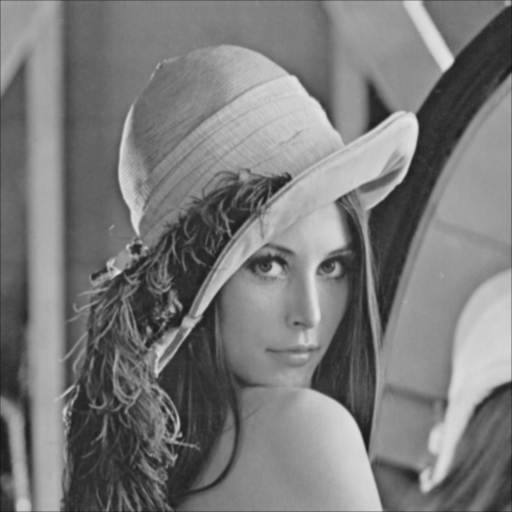
This filter results in this image.
and here is just the grayscaled image for comparison.
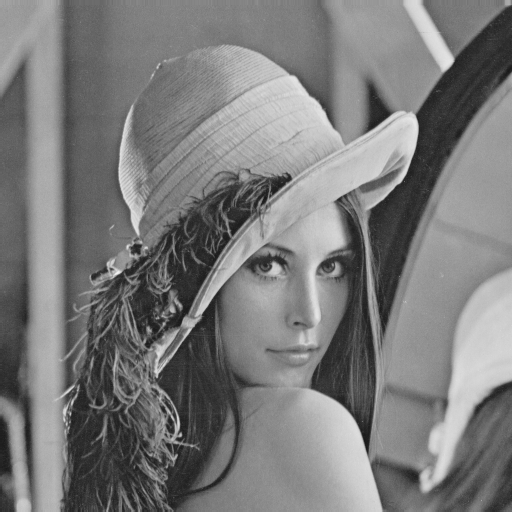
Notice how the feathers in the blurred version of the image have a lack of sharpness and contrast in the image compared to the version of the image that is just grayscaled.
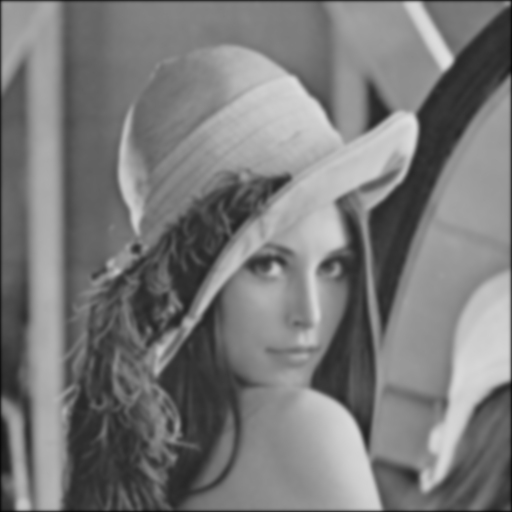
I can also apply the filtering method with that exact kernel multiple times on the same buffer in order to make the differences between the just grayscaled image and the filtered one more obvious. Here I have applied my filter with the gaussian blur kernel 8 times.
Closing Remarks
In this part we have created a function to apply convolution on an image called “filter” that expects a pointer to a ImageBuffer struct and also a kernel. For convenience sake we have defined some symbolic constants that each represent a kernel with its corresponding coefficients for a particular filtering method. I know I have only shown the result of using the gaussian blur kernel on an image, however we also have other kernel that are used to different things. The “SHARPEN” kernel for example can be used to make the edges of an image more prominent and the gaussian blur would be the reverse of that operation.